Testing Maltár in Julia and Mathematica
Julia and Mathematica code for the first Maltár benchmarks, which time a sweep of Lorenz trajectories and a set of eigenvalue problems on two laptops.
This note gives the code and output of the Phase 1 benchmarks of Maltár, whose results are discussed in Section 5 of the main post. Both benchmarks are run from the MacBook Air M1, with workers started over SSH on the ThinkPad P15, which runs Linux. This needs passwordless SSH login from the MacBook Air to the ThinkPad with a key, Julia at /usr/bin/julia on the ThinkPad with the same packages as on the Mac, and a licensed Mathematica on both machines. For the setup, see the guide to the direct Ethernet link. The code is shown as it was run in the notebooks test_cluster.ipynb and maltar_phase_1.nb, with a few long lines wrapped to fit the page. In the code and its output, minastirith is the hostname of the MacBook Air and isengard that of the ThinkPad.
1. Julia
1.1 Worker setup
The Julia benchmark uses Distributed.jl, Julia’s standard library for parallel computing across processes and machines. The first cell kills any Julia processes left on the ThinkPad from an earlier run and removes the local workers:
1
2
3
4
5
6
# nuke remote workers, if any!
run(ignorestatus(`ssh subhodeep@192.168.0.2 "pkill -9 julia"`))
# nuke local workers
using Distributed
rmprocs(workers())
sleep(2)
In a fresh session there are no workers yet, so rmprocs only warns that it cannot remove process 1, the master. The next cell starts eight workers on the Mac and one worker per hardware thread on the ThinkPad:
1
2
3
4
5
6
7
8
using Distributed
addprocs(8); # local kernels
addprocs(
    [("subhodeep@192.168.0.2 192.168.0.2", :auto)];
    exename="/usr/bin/julia",
    dir="/home/subhodeep",
    tunnel=true,
); # remote kernels
In the string "subhodeep@192.168.0.2 192.168.0.2", the first part is the SSH login and the second the address the workers listen on. The symbol :auto starts one worker per hardware thread of the remote machine, twelve on the i7-10850H. The keywords exename and dir set the path of Julia and the working directory on the ThinkPad. With tunnel=true, the master connects to the workers through SSH tunnels, so no port other than SSH has to be open on the ThinkPad.
1.2 Worker check
To check that the workers started on the right machines, each worker prints its hostname:
1
2
3
4
5
6
7
8
9
10
master_host = gethostname();
println("Master process ID: $(myid()) is running on: ",
    "$master_host [MASTER]")
for pid in workers()
    worker_host = fetch(@spawnat pid gethostname());
    location = worker_host == master_host ? "[Local]" : "[Remote]";
    println("Worker process ID: $pid is running on: ",
        "$worker_host $location");
end
println("Set up complete! Total active workers: $(nworkers())")
1
2
3
4
5
6
7
8
Master process ID: 1 is running on: minastirith [MASTER]
Worker process ID: 2 is running on: minastirith [Local]
⋮
Worker process ID: 9 is running on: minastirith [Local]
Worker process ID: 10 is running on: isengard [Remote]
⋮
Worker process ID: 21 is running on: isengard [Remote]
Set up complete! Total active workers: 20
A second cell prints the processor and memory of each worker. The function get_remote_hardware_info reads them from /proc on Linux, from sysctl on macOS and through PowerShell on Windows.
Show the cell, with get_remote_hardware_info
1
2
3
4
5
6
7
8
9
10
11
12
13
14
15
16
17
18
19
20
21
22
23
24
25
26
27
28
29
30
31
32
33
34
35
36
37
38
39
40
41
42
43
44
45
46
47
48
49
50
51
52
53
54
55
56
57
58
59
60
61
62
63
64
65
66
67
using Distributed
using Printf

@everywhere function get_remote_hardware_info()
    try
        if Sys.islinux()
            cpu = "Unknown CPU"
            if isfile("/proc/cpuinfo")
                for line in eachline("/proc/cpuinfo")
                    if startswith(line, "model name") || startswith(line, "Model name")
                        cpu = strip(split(line, ":")[2])
                        break
                    end
                end
            end

            ram = "Unknown RAM"
            if isfile("/proc/meminfo")
                for line in eachline("/proc/meminfo")
                    if startswith(line, "MemTotal:")
                        kb_match = match(r"\d+", line)
                        if kb_match !== nothing
                            kb = parse(Float64, kb_match.match)
                            ram = "$(round(kb / (1024 * 1024), digits=1)) GB"
                        end
                        break
                    end
                end
            end
            return "CPU: $(rpad(cpu, 35)) | RAM: $ram"

        elseif Sys.isapple()
            cpu = readchomp(`sysctl -n machdep.cpu.brand_string`)
            bytes = parse(Float64, readchomp(`sysctl -n hw.memsize`))
            return "CPU: $(rpad(cpu, 35)) | RAM: $(round(bytes / (1024^3), digits=1)) GB"

        elseif Sys.iswindows()
            cpu = strip(readchomp(`powershell -NoProfile -Command "(Get-CimInstance -ClassName Win32_Processor).Name"`))
            bytes = parse(Float64, readchomp(`powershell -NoProfile -Command "(Get-CimInstance -ClassName Win32_ComputerSystem).TotalPhysicalMemory"`))
            return "CPU: $(rpad(cpu, 35)) | RAM: $(round(bytes / (1024^3), digits=1)) GB"

        else
            return "Unsupported OS"
        end
    catch e
        return "Permission Denied / Error Reading Specs"
    end
end

println("\n[Master $(myid()) on $(gethostname())]")
println("-"^90)
@printf("| %-8s | %-15s | %-45s | %-9s |\n", "Worker", "Hostname", "CPU Model", "RAM")
println("-"^90)

for pid in workers()
    host = fetch(@spawnat pid gethostname())
    specs_raw = fetch(@spawnat pid get_remote_hardware_info())

    parts = split(specs_raw, "|")
    cpu_str = replace(strip(parts[1]), "CPU: " => "")
    ram_str = replace(strip(parts[2]), "RAM: " => "")

    @printf("| %-8s | %-15s | %-45s | %-9s |\n", "W: $pid", host, cpu_str, ram_str)
end

println("-"^90)
println("Set up complete! Total active workers: $(nworkers())")
1
2
3
4
5
6
7
8
9
10
[Master 1 on minastirith]
------------------------------------------------------------------------------------------
| Worker   | Hostname        | CPU Model                                     | RAM       |
------------------------------------------------------------------------------------------
| W: 2     | minastirith     | Apple M1                                      | 8.0 GB    |
⋮
| W: 10    | isengard        | Intel(R) Core(TM) i7-10850H CPU @ 2.70GHz     | 62.5 GB   |
⋮
------------------------------------------------------------------------------------------
Set up complete! Total active workers: 20
Linux reports 62.5 GB of the 64 GB in the ThinkPad because the kernel and the firmware reserve the rest.
1.3 Worker pools
A WorkerPool restricts pmap to a subset of the workers. The workers are split by hostname into a local pool and a remote pool, and a third pool holds all twenty:
Show the cell that splits the workers into pools
1
2
3
4
5
6
7
8
9
10
11
12
13
14
15
16
17
18
19
20
21
using Distributed
using Plots

# let us divide the worker pool, we assume there is one remote machine
# in the future, we can refine this part if we add different remote nodes

master_host = gethostname()

# use a simple if else to divide the workers
local_pids = [p for p in workers() if fetch(@spawnat p gethostname()) == master_host]
remote_pids = [p for p in workers() if fetch(@spawnat p gethostname()) != master_host]

# create three pools
local_pool = WorkerPool(local_pids)
remote_pool = WorkerPool(remote_pids)
hybrid_pool = WorkerPool(workers())

# print number of workers
println("Local Pool: $(length(local_pool))")
println("Remote Pool: $(length(remote_pool))")
println("Hybrid Pool: $(length(hybrid_pool))")
1
2
3
Local Pool: 8
Remote Pool: 12
Hybrid Pool: 20
As the comment in the cell says, this split assumes one remote machine, and with the ZBook in Phase 2, each machine will need its own pool.
1.4 Lorenz task
Every worker needs the solver and the task function, so both are loaded and defined with @everywhere:
Show the cell with the Lorenz system and the task
1
2
3
4
5
6
7
8
9
10
11
12
13
14
15
16
17
18
19
20
21
22
23
24
25
26
27
28
29
30
# load the DifferentialEquations library everywhere
@everywhere using DifferentialEquations

# define the math everywhere
@everywhere begin

    # define the system of ODEs (Lorenz Differential Equations)
    function lorenz!(du, u, p, t)
        σ, ρ, β = p
        du[1] = σ * (u[2] - u[1])
        du[2] = u[1] * (ρ - u[3]) - u[2]
        du[3] = u[1] * u[2] - β * u[3]
    end

    # task for a single worker
    function solve_lorenz(rho_val)
        u0 = [1.0, 0.0, 0.0]
        tspan = (0.0, 100.0)
        p = [10.0, rho_val, 8/3] #  σ, ρ, β

        prob = ODEProblem(lorenz!, u0, tspan, p)

        # solve using Tsit5
        sol = solve(prob, Tsit5(), saveat = 0.1)

        # return the final endpoint
        return sol.u[end]
    end

end
Each task returns only three numbers, so the results put almost no load on the network. The notebook also plots the attractor at $\rho = 28$ for ten initial conditions near $(1, 0, 0)$, shown in Fig. 1.
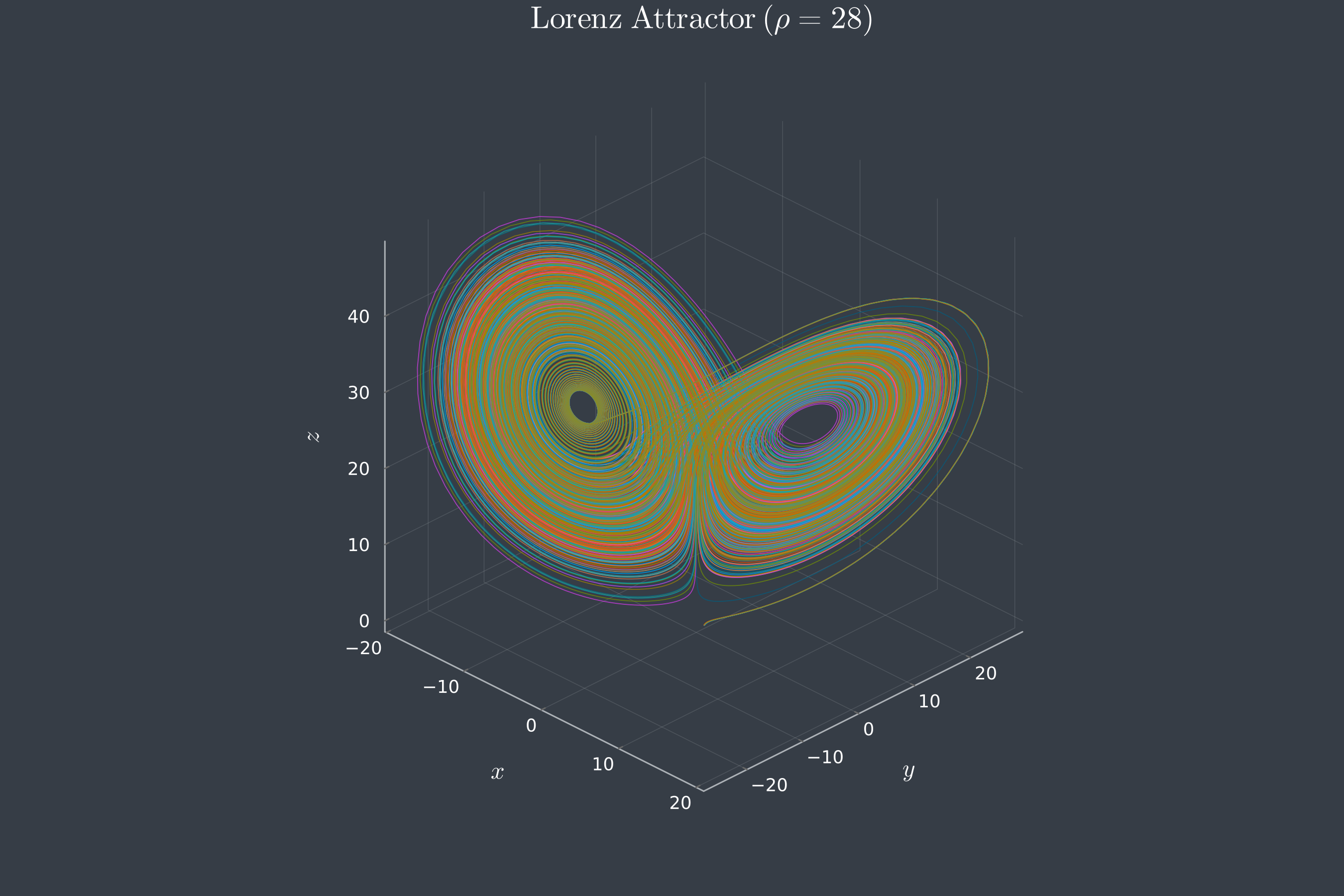
Fig. 1. The Lorenz attractor at $\sigma = 10$, $\rho = 28$ and $\beta = 8/3$, from ten initial conditions within 0.05 of $(1, 0, 0)$, up to $t = 100$, as plotted by the notebook with Plots.jl.
Show the plotting cell of the notebook
1
2
3
4
5
6
7
8
9
10
11
12
13
14
15
16
17
18
19
20
21
22
23
24
25
26
27
28
29
30
31
32
33
34
35
36
37
38
39
40
41
42
43
44
45
46
using Plots, LaTeXStrings, DifferentialEquations

theme(:dark)

# Initial conditions
u0s = [
    [1.0, 0.0, 0.0],
    [1.01, 0.0, 0.0],
    [1.0, 0.01, 0.0],
    [1.0, 0.0, 0.01],
    [1.01, 0.01, 0.01],
    [1.05, 0.0, 0.0],
    [1.0, 0.05, 0.0],
    [1.0, 0.0, 0.05],
    [1.05, 0.05, 0.0],
    [1.02, 0.02, 0.02]
]


p = plot(
    xlabel=L"x", ylabel=L"y", zlabel=L"z",
    title=L"\mathrm{Lorenz\ Attractor}\ (\rho = 28)",
    size=(900, 600),
    dpi=300,
    #legend=:topright,
    camera=(45, 30),
    gridalpha=0.2,
    foreground_color_axis=:gray40,

)

for (i, u0) in enumerate(u0s)
    prob = ODEProblem(lorenz!, u0, (0.0, 100.0), [10.0, 28.0, 8/3])

    sol = solve(prob, Tsit5())

    plot!(p, sol, idxs=(1,2,3),
        label="",
        #label="Trajectory $i",
        lw=0.6,
        alpha=0.70
    )
end

display(p)
1.5 Timing runs
The function run_benchmark first calls pmap on two values of $\rho$ to compile solve_lorenz, then times pmap over num_points values of $\rho$ on one pool with @elapsed. The keyword batch_size sets how many tasks are sent to a worker in one message, and its value depends on the pool:
Show the benchmark cell, with run_benchmark
1
2
3
4
5
6
7
8
9
10
11
12
13
14
15
16
17
18
19
20
21
22
23
24
25
26
27
28
29
30
31
32
33
34
35
36
37
38
39
40
41
42
43
44
45
46
47
48
49
50
51
52
53
54
55
56
57
58
59
60
61
62
63
64
65
66
67
68
# let us now set up a function to compare performance of the cluster
function run_benchmark(pool, pool_name, num_points)
    rho_parameters = range(10.0, 50.0, length=num_points)

    # warm-up to compile the function
    # so Julia's JIT compiler doesn't skew the timing
    pmap(solve_lorenz, pool, [10.0, 11.0])

    # We want roughly 4 batches per worker so they steal frequently,
    # but not constantly.
    # We use length(pool) instead of nworkers() so the math adapts to
    # Local vs Hybrid.
    # chunks_per_worker = 4
    # dynamic_batch = max(1, ceil(Int,
    #     num_points / (length(pool) * chunks_per_worker)))

    if pool_name == "LOCAL ONLY"
        # No batching (tasks as fast as possible).
        # We prefer @threads here, but for pmap, batch_size=1 is the
        # direct equivalent.

        dynamic_batch = 1

    elseif pool_name == "REMOTE ONLY"
        # Send everything at once.
        # By setting batch_size to the total length, we eliminate all
        # scheduler overhead after the initial connection.
        chunks_per_worker = 2
        dynamic_batch = max(1, ceil(Int,
            num_points / (length(pool) * chunks_per_worker)))

    elseif pool_name == "HYBRID"
        # Dynamic.
        # We allow the faster Mac to 'steal' batches from the queue,
        # ensuring both machines are fully utilized until the last
        # second.
        chunks_per_worker = 4
        dynamic_batch = max(1, ceil(Int,
            num_points / (length(pool) * chunks_per_worker)))
    else
        dynamic_batch = 500
    end

    println("Running $num_points simulations on [$pool_name]...")
    println(" -> Dynamic Batch Size: $dynamic_batch ",
        "tasks per network payload")
    time_taken = @elapsed pmap(solve_lorenz, pool, rho_parameters;
        batch_size=dynamic_batch)

    println(" -> Time: $(round(time_taken, digits=3)) seconds.")
    return time_taken
end

# perform the test
# Starts at 10 trajectories, increases by 100 each step, up to 910
# (exactly 10 points)
simulation_sizes = collect(10:100:50_000)
times_local = Float64[]
times_remote = Float64[]
times_hybrid = Float64[]

println("\n--- Starting Benchmark ---")
for size in simulation_sizes
    println("\n[ Batch Size: $size Trajectories ]")
    push!(times_local, run_benchmark(local_pool, "LOCAL ONLY", size))
    push!(times_remote, run_benchmark(remote_pool, "REMOTE ONLY", size))
    push!(times_hybrid, run_benchmark(hybrid_pool, "HYBRID", size))
end
The local pool gets one task per message, the remote pool two batches per worker, and the hybrid pool four batches per worker, so that the faster workers can take more batches. Two comments in the cell are left over from earlier versions. The remote pool does not get all its tasks at once, and simulation_sizes holds 500 sizes, from 10 to 49,910 trajectories. In the output, “Batch Size” in the heading of each size is the number of trajectories, not the batch_size of pmap:
Show the output for the first two sizes
1
2
3
4
5
6
7
8
9
10
11
12
13
14
15
16
17
18
19
20
21
22
23
24
--- Starting Benchmark ---

[ Batch Size: 10 Trajectories ]
Running 10 simulations on [LOCAL ONLY]...
 -> Dynamic Batch Size: 1 tasks per network payload
 -> Time: 11.041 seconds.
Running 10 simulations on [REMOTE ONLY]...
 -> Dynamic Batch Size: 1 tasks per network payload
 -> Time: 3.441 seconds.
Running 10 simulations on [HYBRID]...
 -> Dynamic Batch Size: 1 tasks per network payload
 -> Time: 0.056 seconds.

[ Batch Size: 110 Trajectories ]
Running 110 simulations on [LOCAL ONLY]...
 -> Dynamic Batch Size: 1 tasks per network payload
 -> Time: 0.022 seconds.
Running 110 simulations on [REMOTE ONLY]...
 -> Dynamic Batch Size: 5 tasks per network payload
 -> Time: 1.965 seconds.
Running 110 simulations on [HYBRID]...
 -> Dynamic Batch Size: 2 tasks per network payload
 -> Time: 2.663 seconds.
⋮
Some of the measured times are listed in Table I, and all of them are plotted in Fig. 2.
Table I. Time in seconds to solve $N$ Lorenz trajectories on each pool.
| $N$ | MacBook Air (8) | ThinkPad (12) | Both (20) |
|---|---|---|---|
| 10 | 11.041 | 3.441 | 0.056 |
| 110 | 0.022 | 1.965 | 2.663 |
| 1,010 | 0.184 | 0.159 | 0.127 |
| 5,010 | 0.669 | 0.748 | 0.416 |
| 10,010 | 1.478 | 1.515 | 1.255 |
| 25,010 | 4.255 | 3.858 | 2.047 |
| 49,910 | 7.768 | 7.485 | 4.374 |
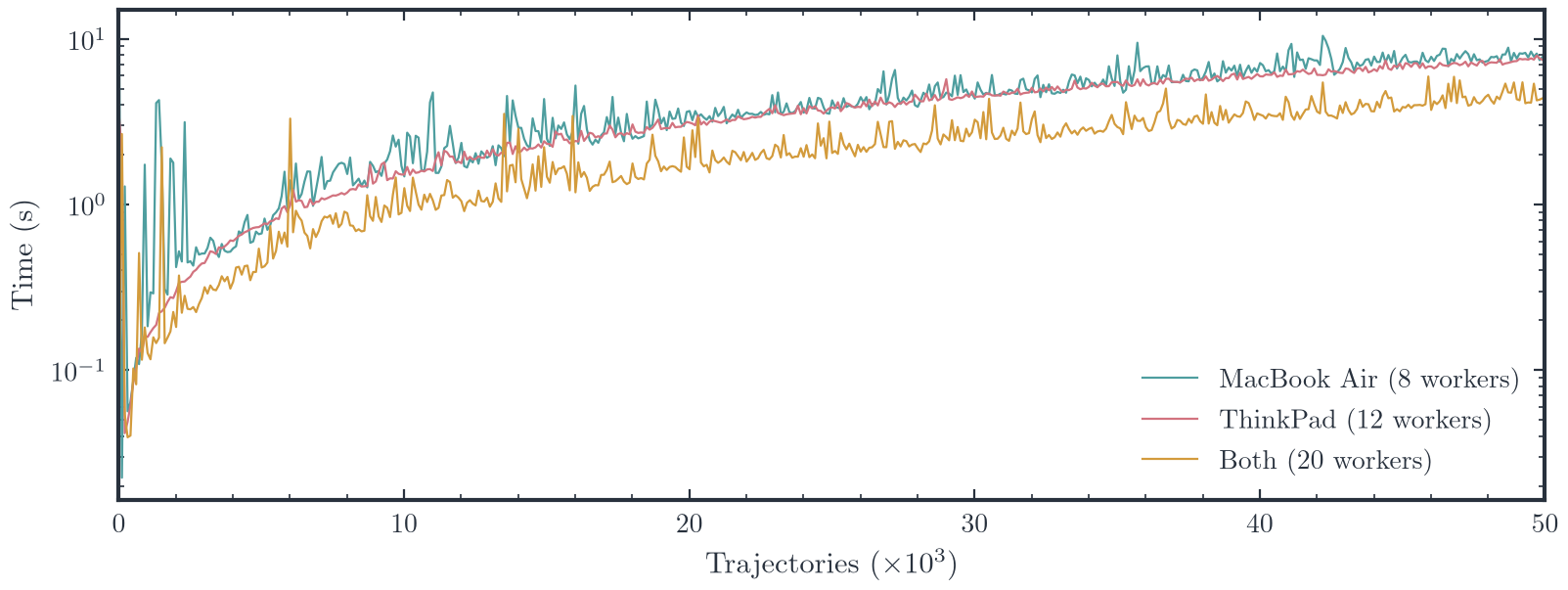
Fig. 2. Time to solve $N$ Lorenz trajectories with pmap on the MacBook Air, the ThinkPad and both.
Show the plotting cell of the notebook
1
2
3
4
5
6
7
8
9
10
11
12
13
14
15
16
17
18
19
20
21
22
23
24
25
26
using Plots, LaTeXStrings

theme(:dark)

p = plot(simulation_sizes, times_local,
        label="Local ($(length(local_pids)) workers)",
        #marker=:circle, ms=2,
        lw=1,
        xlabel=L"\mathrm{Number\ of\ trajectories}",
        ylabel=L"\mathrm{Time\ (s)}",
        yaxis=:log10,
        legend=:bottomright,
        size=(600,350),
        dpi=200)

plot!(p, simulation_sizes, times_remote,
    label="Remote ($(length(remote_pids)) workers)",
    #marker=:circle, ms=2,
    lw=1)

plot!(p, simulation_sizes, times_hybrid,
    label="Hybrid ($(nworkers()) workers)",
    #marker=:circle, ms=2, l
    w=1)

display(p)
The first few times are misleading, because the warm-up call sends only two tasks and compiles solve_lorenz on at most two workers of each pool, leaving the others to compile it during their first timed run. The 11 s of the first local run and the 2–3 s of the first remote and hybrid runs mostly measure this compilation. A warm-up with at least one task per worker, such as pmap(solve_lorenz, pool, fill(10.0, length(pool))), would remove the effect. Above a few thousand trajectories, the time grows linearly with $N$, and the twenty workers together need 55–60% of the time that either machine needs alone.
1.6 Output
The timings are saved to a CSV file:
1
2
3
4
5
6
7
8
9
10
using CSV, DataFrames

df = DataFrame(
    trajectories = simulation_sizes,
    local_time_seconds = times_local,
    remote_time_seconds = times_remote,
    hybrid_time_seconds = times_hybrid,
)

CSV.write("lorenz_scaling_performance.csv", df)
The throughput is the number of trajectories divided by the time. The notebook also adds the throughputs of the two machines, which gives the dashed line in Fig. 2 of the main post:
1
2
3
4
throughput_local  = simulation_sizes ./ times_local;
throughput_remote = simulation_sizes ./ times_remote;
throughput_hybrid = simulation_sizes ./ times_hybrid;
throughput_sum = throughput_local .+ throughput_remote;
Show the plotting cell of the notebook
1
2
3
4
5
6
7
8
9
10
11
12
13
14
15
16
17
18
19
20
21
22
23
24
25
26
27
28
29
30
31
using Plots, LaTeXStrings

theme(:dark)

p = plot(simulation_sizes, throughput_local,
    label="Local ($(length(local_pids)) workers)",
    # marker=:circle, ms=6,
    lw=1,
    #yaxis=:log10,
    xlabel=L"\mathrm{Number\ of\ trajectories}",
    ylabel=L"\mathrm{Throughput\ (trajectories/s)}",
    legend=:bottomright,
    size=(600,350),
    dpi=200)

plot!(p, simulation_sizes, throughput_remote,
    label="Remote ($(length(remote_pids)) workers)",
    # marker=:circle, ms=6,
    lw=1)

plot!(p, simulation_sizes, throughput_hybrid,
    label="Hybrid ($(nworkers()) workers [Measured])",
    #marker=:circle, ms=6,
    lw=1)

plot!(simulation_sizes, throughput_sum,
    label="Local + Remote (ideal)",
    # color=:red,
    ls=:dash, lw=1)

display(p)
While the notebook drew this last plot, three of the remote workers, 10, 13 and 20, terminated with an EOFError. The timings had already been saved by then. The script in Section 3 draws all the Julia figures from the CSV file.
2. Mathematica
2.1 Kernel setup
Remote kernels are launched over SSH with KernelConfiguration, and one call to LaunchKernels starts eight kernels on the Mac and twelve on the ThinkPad:
1
2
3
4
5
6
CloseKernels[];
localkernels = 8;
remotekernels = 12;
isengardpath = "ssh://subhodeep@isengard";
LaunchKernels[{localkernels,
   KernelConfiguration[isengardpath, "KernelCount" -> remotekernels]}];
Each kernel then reports its host, process ID, operating system, number of cores and version:
1
2
3
4
5
6
7
8
kerneldat = ParallelEvaluate[{$MachineName, $ProcessorCount,
     $SystemID, $Version}];
stats = ParallelEvaluate@<|"ID" -> $KernelID, "Host" -> $MachineName,
     "PID" -> $ProcessID, "OS" -> $SystemID,
     "Cores" -> $ProcessorCount, "Version" -> $Version|>;
Grid[Prepend[stats /. a_Association :> Values[a],
  {"ID", "Host", "PID", "OS", "Cores", "Version"}], Frame -> All,
 Background -> {None, {Lighter[Gray, .9], None}}, Alignment -> Left]
1
2
3
4
5
6
ID  Host         PID     OS            Cores  Version
1   minastirith  9931    MacOSX-ARM64  8      14.2.1 for Mac OS X ARM
⋮
8   minastirith  9938    MacOSX-ARM64  8      14.2.1 for Mac OS X ARM
9   isengard     204318  Linux-x86-64  6      14.3.0 for Linux x86
⋮
The version strings are shortened in the table, and in full they read “14.2.1 for Mac OS X ARM (64-bit) (March 16, 2025)” and “14.3.0 for Linux x86 (64-bit) (July 8, 2025)”. The two machines run different releases of Mathematica, which is harmless here since the benchmark uses only built-in functions.
2.2 Timing runs
Each task generates a random $3000 \times 3000$ matrix with entries between 0 and 1 and returns its spectral radius:
1
2
3
dim = 3000;
num = 120;
spectralradiusF[n_] := Max[Abs[Eigenvalues[RandomReal[1, {n, n}]]]];
For each run, the kernels of one pool are restarted and given the definition, and ParallelMap is timed over 120 copies of the dimension. The notebook does this on the ThinkPad, on the Mac and on both, with the coarsest and the finest grained distribution:
Show the six timing runs
1
2
3
4
5
6
7
8
9
10
11
12
13
14
15
16
17
18
19
20
21
22
23
24
25
26
27
28
29
30
31
32
33
34
35
36
37
38
CloseKernels[];
LaunchKernels[
  KernelConfiguration[isengardpath, "KernelCount" -> remotekernels]];
DistributeDefinitions[spectralradiusF];
p15TimeC = AbsoluteTiming[ParallelMap[spectralradiusF,
     ConstantArray[dim, num], Method -> "CoarsestGrained"]][[1]]

CloseKernels[];
LaunchKernels[
  KernelConfiguration[isengardpath, "KernelCount" -> remotekernels]];
DistributeDefinitions[spectralradiusF];
p15TimeF = AbsoluteTiming[ParallelMap[spectralradiusF,
     ConstantArray[dim, num], Method -> "FinestGrained"]][[1]]

CloseKernels[];
LaunchKernels[localkernels];
DistributeDefinitions[spectralradiusF];
m1TimeC = AbsoluteTiming[ParallelMap[spectralradiusF,
     ConstantArray[dim, num], Method -> "CoarsestGrained"]][[1]]

CloseKernels[];
LaunchKernels[localkernels];
DistributeDefinitions[spectralradiusF];
m1TimeF = AbsoluteTiming[ParallelMap[spectralradiusF,
     ConstantArray[dim, num], Method -> "FinestGrained"]][[1]]

CloseKernels[];
LaunchKernels[{localkernels,
   KernelConfiguration[isengardpath, "KernelCount" -> remotekernels]}];
DistributeDefinitions[spectralradiusF];
maltarTimeCoarse = AbsoluteTiming[ParallelMap[spectralradiusF,
     ConstantArray[dim, num], Method -> "CoarsestGrained"]][[1]]

CloseKernels[];
LaunchKernels[{localkernels,
   KernelConfiguration[isengardpath, "KernelCount" -> remotekernels]}];
maltarTimeFine = AbsoluteTiming[ParallelMap[spectralradiusF,
     ConstantArray[dim, num], Method -> "FinestGrained"]][[1]]
The last run skips DistributeDefinitions, which does no harm, since ParallelMap sends the definitions it needs to the kernels by itself. The six times are listed in Table II.
Table II. Time in seconds to compute the spectral radii of 120 random $3000 \times 3000$ matrices.
| Kernels | CoarsestGrained |
FinestGrained |
|---|---|---|
| MacBook Air (8) | 361.919 | 394.768 |
| ThinkPad (12) | 383.948 | 395.444 |
| Both (20) | 233.649 | 195.544 |
The notebook also keeps the chart of an earlier run, in which the ThinkPad was reached over Wi-Fi instead of the Ethernet cable. That run took 355.6 s and 385.8 s on the MacBook Air, 384.3 s and 398.6 s on the ThinkPad, and 231.0 s and 204.3 s on both, with the coarsest and the finest grained distribution. These times are close to those over Ethernet, as expected for a benchmark that sends so little data over the network.
The notebook plots the times of Table II as a bar chart with the code below, and Fig. 1 of the main post shows the same data:
Show the bar chart cell
1
2
3
4
5
6
7
8
9
10
11
12
combinedData = {{m1TimeC, m1TimeF}, {p15TimeC, p15TimeF},
   {maltarTimeCoarse, maltarTimeFine}};
BarChart[combinedData,
 ChartLabels -> {{"M1 8 Cores", "P15G1 12 Threads (RJ45/SSH) ",
     "Combined (RJ45/SSH)"}, {"Coarse", "Fine"}},
 ChartStyle -> {"Pastel", "DarkRainbow"},
 PlotLabel -> "Maltar Tactical Compute Asset v0.01: Time taken to compute eigenvalues of 120 real random matrices of dimension 3000x3000 ",
 FrameLabel -> {None, "Time (seconds)"},
 LabelingFunction -> (Placed[NumberForm[#, {4, 1}], Above] &),
 ImageSize -> 700, GridLines -> {None, Automatic},
 ChartLegends -> Placed[{"Coarsest Grained", "FinestGrained"},
   {Right, Top}], Frame -> True, FrameStyle -> Thick]
3. Figures
Apart from Fig. 1, which is the notebook’s own plot, the figures of both posts are drawn from the measured timings by one Python script, maltar_figures.py. It reads the Julia timings from lorenz_scaling_performance.csv and the Mathematica timings from Table II, prints the speedups of Table III in the main post, and saves each figure twice, for the light and dark themes of this site, in my matplotlib stylesheet amore. To run the script, put it next to the folder maltar_tests with the CSV file and use uv:
1
uv run maltar_figures.py
Show the script, maltar_figures.py
1
2
3
4
5
6
7
8
9
10
11
12
13
14
15
16
17
18
19
20
21
22
23
24
25
26
27
28
29
30
31
32
33
34
35
36
37
38
39
40
41
42
43
44
45
46
47
48
49
50
51
52
53
54
55
56
57
58
59
60
61
62
63
64
65
66
67
68
69
70
71
72
73
74
75
76
77
78
79
80
81
82
83
84
85
86
87
88
89
90
91
92
93
94
95
96
97
98
99
100
101
102
103
104
105
106
107
108
109
110
111
112
113
114
115
116
117
118
119
120
121
122
123
124
125
126
127
128
129
130
131
132
133
134
135
136
137
138
139
140
141
142
143
144
145
146
147
148
149
150
151
152
153
154
155
156
157
158
159
160
161
162
163
164
165
166
167
168
169
170
171
172
173
174
175
176
177
178
179
180
181
182
183
184
185
186
187
188
189
190
191
192
193
194
195
196
197
198
199
200
201
202
203
204
205
206
207
208
209
210
211
212
213
214
215
216
217
218
219
220
221
222
223
224
225
226
227
228
229
230
231
232
233
234
235
236
237
238
239
240
241
242
243
244
245
246
247
248
249
250
251
252
253
254
255
256
257
258
259
260
261
262
263
264
265
266
267
268
269
270
271
272
273
274
275
276
277
278
279
280
281
282
283
284
285
286
287
288
289
290
291
292
293
294
295
296
297
298
299
300
301
302
303
304
305
306
307
308
309
310
311
312
313
314
315
316
317
318
319
320
321
322
323
324
325
326
327
328
329
330
331
332
333
334
335
336
337
338
339
340
341
342
343
344
345
346
347
348
349
350
351
352
353
354
355
356
357
358
359
360
361
362
363
364
365
366
367
368
369
370
371
372
373
374
375
376
377
378
379
380
381
382
383
384
385
386
387
388
389
390
391
#!/usr/bin/env python3
#
# Author(s): Subhodeep Sarkar
# Affiliation: IIT Gandhinagar and IIIT Allahabad
# Contact: subhodeep.sarkar1@gmail.com
# Date: June 2026
# Last updated: October 2026
# Github: https://github.com/subhodeeps/quasinormal-notes
#
# /// script
# requires-python = ">=3.10"
# dependencies = [
#     "numpy",
#     "matplotlib",
#     "amore @ git+https://github.com/subhodeeps/amore.mplstyle",
# ]
# ///

"""Plot the Phase-1 benchmarks of the Maltár cluster.

The first figure shows the Mathematica benchmark: the time to compute
the spectral radii of 120 random 3000 x 3000 matrices with
`ParallelMap`, on the MacBook Air alone, on the ThinkPad alone and on
both, with the coarsest and the finest grained distribution of the
work. The timings come from maltar_tests/maltar_phase_1.nb.

The second and third figures show the Julia benchmark: the time to
solve the Lorenz system for a sweep of rho with `pmap`, and the number
of trajectories solved per second, against the number of
trajectories, for the same three pools of workers. The timings come
from maltar_tests/lorenz_scaling_performance.csv, which
maltar_tests/test_cluster.ipynb wrote.

The script prints the speedup of both machines over the faster
machine alone for each benchmark, and saves each figure twice, as
<name>-light.png and <name>-dark.png, for the light and dark themes of
the site. These are
the figures of the posts "The Maltár Tactical Compute Asset" and
"Testing Maltár in Julia and Mathematica".

The amore MPL stylesheet (https://github.com/subhodeeps/amore.mplstyle)
is optional. Without it, the figures use the default matplotlib style
with the same colours. amore typesets text with LaTeX; set USETEX =
False below if LaTeX is not installed.

Usage
-----
    uv run maltar_figures.py [folder]

The script saves the figures in ./figures, or in `folder` if given.
"""

import sys
from pathlib import Path

import matplotlib

matplotlib.use("Agg")

import matplotlib.pyplot as plt
import numpy as np

try:
    import amore
except ImportError:
    amore = None


# --- Data -------------------------------------------------------------

HERE = Path(__file__).resolve().parent
TIMINGS = HERE / "maltar_tests" / "lorenz_scaling_performance.csv"

# Seconds for the 120 spectral radii, from maltar_phase_1.nb, as
# (CoarsestGrained, FinestGrained)
EIGEN = {
    "MacBook Air\n8 kernels": (361.919, 394.768),
    "ThinkPad\n12 kernels": (383.948, 395.444),
    "Both\n20 kernels": (233.649, 195.544),
}

SMALLEST = 1000  # trajectories; smaller runs take under 0.2 s
WINDOW = 25  # points in the running median of the throughput


def running_median(y, window=WINDOW):
    """Return the running median of y over `window` points.

    Parameters
    ----------
    y : ndarray
        Values to smooth.
    window : int, optional
        Number of points in the window, centred where possible.

    Returns
    -------
    ndarray
        Running median, of the same length as y.
    """
    half = window // 2
    return np.array(
        [
            np.median(y[max(0, i - half) : i + half + 1])
            for i in range(len(y))
        ]
    )


def timings():
    """Return the timings of the Julia benchmark for each pool.

    Returns
    -------
    numpy.ndarray
        Structured array with the number of trajectories under
        "trajectories" and the seconds of each pool under
        "<pool>_time_seconds", for "local", "remote" and "hybrid".
    """
    return np.genfromtxt(TIMINGS, delimiter=",", names=True)


def throughput():
    """Return the throughput of the Julia benchmark for each pool.

    Returns
    -------
    dict
        The numbers of trajectories under "n", and for each pool
        ("local", "remote", "hybrid") the trajectories per second, raw
        and as a running median under "<pool>_median".
    """
    data = timings()
    keep = data["trajectories"] >= SMALLEST
    n = data["trajectories"][keep]
    out = dict(n=n)
    for pool in ["local", "remote", "hybrid"]:
        rate = n / data[f"{pool}_time_seconds"][keep]
        out[pool] = rate
        out[f"{pool}_median"] = running_median(rate)
    return out


def summary(times, rates):
    """Summarise the gain of both machines over the faster one alone.

    The speedup divides the best time of either machine alone, with
    any method, by the time of both machines together. For the Julia
    benchmark, it uses the largest run and the median throughput.

    Parameters
    ----------
    times : numpy.ndarray
        Timings of the Julia benchmark, from `timings`.
    rates : dict
        Throughput of the Julia benchmark, from `throughput`.

    Returns
    -------
    str
        The speedups of both benchmarks, and the median throughput of
        each pool with its share of the sum of the two machines.
    """
    alone = min(min(t) for t in list(EIGEN.values())[:2])
    coarse, fine = list(EIGEN.values())[2]
    last = times[-1]
    lorenz_alone = min(
        last["local_time_seconds"], last["remote_time_seconds"]
    )
    medians = {
        pool: np.median(rates[pool])
        for pool in ["local", "remote", "hybrid"]
    }
    total = medians["local"] + medians["remote"]
    faster = max(medians["local"], medians["remote"])
    return (
        f"Eigenvalues: best alone {alone:.1f} s; both {coarse:.1f} s "
        f"(speedup {alone / coarse:.2f}) and {fine:.1f} s "
        f"(speedup {alone / fine:.2f}).\n"
        f"Lorenz, {last['trajectories']:.0f} trajectories: best alone "
        f"{lorenz_alone:.3f} s, both "
        f"{last['hybrid_time_seconds']:.3f} s "
        f"(speedup {lorenz_alone / last['hybrid_time_seconds']:.2f}).\n"
        f"Lorenz throughput: local {medians['local']:.0f}/s, remote "
        f"{medians['remote']:.0f}/s, both {medians['hybrid']:.0f}/s "
        f"(speedup {medians['hybrid'] / faster:.2f}, "
        f"{medians['hybrid'] / total:.0%} of the sum)."
    )


# --- Drawing ----------------------------------------------------------

POOLS = {
    "local": "MacBook Air (8 workers)",
    "remote": "ThinkPad (12 workers)",
    "hybrid": "Both (20 workers)",
}


def figure_times(data, colours):
    """Draw the time of the Julia benchmark against its size."""
    fig, ax = plt.subplots(figsize=LOOK["size"], layout="constrained")
    times = data["timings"]
    n = times["trajectories"] / 1000
    for (pool, label), colour in zip(
        POOLS.items(), colours["lines"], strict=True
    ):
        ax.plot(
            n,
            times[f"{pool}_time_seconds"],
            color=colour,
            lw=0.8,
            label=label,
        )
    ax.set_yscale("log")
    ax.set_xlim(0, 50)
    ax.set_xlabel(r"Trajectories ($\times 10^3$)")
    ax.set_ylabel("Time (s)")
    ax.legend(loc="lower right")
    return fig


def figure_eigenvalues(data, colours):
    """Draw the times of the eigenvalue benchmark as grouped bars."""
    fig, ax = plt.subplots(figsize=LOOK["size"], layout="constrained")
    x = np.arange(len(EIGEN))
    width = LOOK["bar_width"]
    methods = ["CoarsestGrained", "FinestGrained"]
    for j, (method, colour) in enumerate(
        zip(methods, colours["bars"], strict=True)
    ):
        times = [t[j] for t in EIGEN.values()]
        bars = ax.bar(
            x + (j - 0.5) * width,
            times,
            width,
            color=colour,
            label=rf"\texttt}" if USETEX else method,
        )
        ax.bar_label(bars, fmt="%.0f", padding=2)
    ax.set_xticks(x, list(EIGEN))
    ax.set_xlim(-0.6, len(EIGEN) - 0.3)
    ax.set_ylim(0, 470)
    ax.set_ylabel("Time (s)")
    ax.legend(loc="upper right", ncols=2)
    return fig


def figure_throughput(data, colours):
    """Draw the throughput of the Julia benchmark against its size."""
    fig, ax = plt.subplots(figsize=LOOK["size"], layout="constrained")
    rates = data["rates"]
    n = rates["n"] / 1000
    for (pool, label), colour in zip(
        POOLS.items(), colours["lines"], strict=True
    ):
        ax.plot(n, rates[pool], color=colour, lw=0.5, alpha=0.35)
        ax.plot(
            n,
            rates[f"{pool}_median"],
            color=colour,
            lw=LOOK["line_width"],
            label=label,
        )
    ax.plot(
        n,
        rates["local_median"] + rates["remote_median"],
        color=colours["text"],
        lw=LOOK["line_width"],
        ls="dashed",
        label="Sum of the two machines",
    )
    ax.set_xlim(0, 50)
    ax.set_ylim(0, 16000)
    ax.set_xlabel(r"Trajectories ($\times 10^3$)")
    ax.set_ylabel("Trajectories per second")
    ax.legend(loc="lower right", ncols=2)
    return fig


FIGURES = {
    "eigenvalues": figure_eigenvalues,
    "lorenz-times": figure_times,
    "lorenz-throughput": figure_throughput,
}


# --- Aesthetics -------------------------------------------------------

USETEX = True

if amore is not None:
    TEAL, RED, AMBER, BLUE, SLATE = (
        amore.palette("teal"),
        amore.palette("red"),
        amore.palette("amber"),
        amore.palette("blue"),
        amore.palette("slate"),
    )
else:
    # The same colours as the amore palettes
    TEAL = dict(main="#4e9e9f")
    RED = dict(main="#d2737f")
    AMBER = dict(main="#d39b3c")
    BLUE = dict(main="#5c9dc7")
    SLATE = dict(ink="#28313d", light="#c2c9d1")

BARS = [BLUE["main"], AMBER["main"]]  # coarsest and finest grained
LINES = [
    TEAL["main"],
    RED["main"],
    AMBER["main"],
]  # MacBook Air, ThinkPad and both

THEMES = {
    "light": dict(text=SLATE["ink"], bars=BARS, lines=LINES),
    "dark": dict(text=SLATE["light"], bars=BARS, lines=LINES),
}

LOOK = dict(
    size=(8.0, 3.0),  # figure size in inches
    dpi=200,
    bar_width=0.36,
    line_width=1.3,
)


def use_theme(theme):
    """Set the style and colours for one theme of the site.

    Uses amore if it is installed and the default matplotlib style
    otherwise, with a transparent background in both cases.

    Parameters
    ----------
    theme : {"light", "dark"}
        Theme of the site.

    Returns
    -------
    dict
        Colours of the theme, from `THEMES`.
    """
    if amore is not None:
        amore.use()
    else:
        plt.style.use("default")
    colours = THEMES[theme]
    plt.rcParams.update(
        {
            "text.usetex": USETEX,
            "mathtext.fontset": "cm",  # used when USETEX is False
            "text.color": colours["text"],
            "axes.labelcolor": colours["text"],
            "axes.edgecolor": colours["text"],
            "xtick.color": colours["text"],
            "ytick.color": colours["text"],
            "axes.facecolor": "none",
            "figure.facecolor": "none",
            "savefig.transparent": True,
            "axes.grid": False,
            "legend.frameon": False,
        }
    )
    return colours


def main(out=Path("figures")):
    """Read the timings, then save every figure in both themes.

    Parameters
    ----------
    out : pathlib.Path, optional
        Folder for the figures.
    """
    data = dict(timings=timings(), rates=throughput())
    print(summary(data["timings"], data["rates"]))
    out.mkdir(parents=True, exist_ok=True)
    for theme in THEMES:
        colours = use_theme(theme)
        for name, draw in FIGURES.items():
            fig = draw(data, colours)
            path = out / f"{name}-{theme}.png"
            fig.savefig(path, dpi=LOOK["dpi"])
            plt.close(fig)
            print(path)


if __name__ == "__main__":
    main(Path(sys.argv[1]) if len(sys.argv) > 1 else Path("figures"))
Linked from
- The Maltár Tactical Compute Asset Notes on Maltár, a small cluster I am building from my own laptops, with its first benchmarks in Mathematica and Julia.
- A Direct Ethernet Link between a MacBook Air and an Arch Linux ThinkPad A single USB-C to RJ45 cable between a MacBook Air M1 and a ThinkPad P15 running Arch Linux, with fixed addresses, checks of the link, and passwordless SSH for Julia workers and Mathematica kernels.