The Maltár Tactical Compute Asset
Notes on Maltár, a small cluster I am building from my own laptops, with its first benchmarks in Mathematica and Julia.
I am building a small private compute cluster, Maltár, from machines I already own. It is not meant to replace a workstation or a proper HPC cluster, only to give useful multicore and GPU throughput for physics on hardware that survives the frequent moves and uncertain institutional access of postdoc life.
The cluster has one control node and, once complete, two workers on a private network. Julia and Mathematica jobs are launched from the control node and run in parallel on a shared pool of workers. Maltár is similar to a small heterogeneous Beowulf cluster, but without a job scheduler, since I am its only user.
Phase 1 is running on two nodes with 14 cores (20 threads). Phase 2 will add a third node and bring the total to 22 cores.
1. Compute nodes
Table I. Configuration of the compute nodes in our heterogeneous cluster.
| MacBook Air M1 | ThinkPad P15 Gen 1 | ZBook Fury G8 | |
|---|---|---|---|
| Hostname | minastirith |
isengard |
erebor |
| CPU | Apple M1, 8 cores | Intel i7-10850H, 6 cores, 12 threads | Intel Xeon W-11955M, 8 cores |
| GPU | Apple M1, 7 cores | Quadro RTX 3000, 6 GB | RTX A2000, 4 GB |
| RAM | 8 GB | 64 GB DDR4 | 32 GB ECC DDR4 |
| Storage | 256 GB SSD | 512 GB QLC and 1 TB TLC NVMe | 512 GB NVMe SSD |
| Phase | 1 | 1 | 2 |
The MacBook Air M1 has been my daily laptop since 2021 and is the control node of the cluster. This is where I write code, run notebooks and look at the results. Its eight ARM cores also take part in the computation, mostly in symbolic work and preprocessing, and its integrated GPU can run numerical kernels through Metal. If a worker fails or goes offline, I can still write and run code on the MacBook Air alone.
The main worker is a used ThinkPad P15, with six x86 cores and an NVIDIA GPU for long runs in C++, Fortran, Julia and CUDA. If I can shore up the funds, I will add a used ZBook Fury G8 in Phase 2. Its Xeon supports AVX-512 and has a higher IPC than the i7 in the ThinkPad, so it would be used for vectorised and BLAS-heavy work, and its GPU would be the second NVIDIA GPU in the cluster.
2. Network
In Phase 1, the MacBook Air is connected to the ThinkPad with a USB-C to RJ45 Cat6 cable. All traffic between the two machines goes over this private 1 GbE link, including SSH, file synchronisation, job launches and the messages between the Julia and Mathematica workers. In Phase 2, all three machines will be connected through a small Ethernet switch. For the setup of the cable, the addresses and SSH, see the guide to the direct Ethernet link.
3. Build phases
In Phase 1, the MacBook Air and the ThinkPad together have 14 cores with 20 threads, the M1 GPU and an NVIDIA GPU with 6 GB of VRAM. Section 5 gives the first benchmarks on this pair. With the ZBook, Phase 2 would have 22 cores, AVX-512 and a second NVIDIA GPU with 4 GB of VRAM.
In Phase 2, the ThinkPad and the ZBook will also sit on external cooling pads from FourDot Coolings or FEDGER. Each pad has several fans on its own 12 V supply with speed control. The fans run at up to about 4000 rpm on the smaller pads and 3000 rpm on the larger ones and blow air into the intakes of the laptop. They are loud, but they keep the intake and surface temperatures lower and delay thermal throttling under sustained CPU and GPU load.
4. Workloads
Maltár is suited to embarrassingly parallel problems in physics, where a computation splits into many independent jobs. The whole computation finishes sooner because many jobs run at once, but a single job runs no faster than it would on its own node. Typical examples are the time integration of ODEs with DifferentialEquations.jl, Sundials.jl or DynamicalSystems.jl, geodesic and ray tracing, and parameter scans of integrals. In Julia these jobs are distributed with Distributed.jl, the standard library for parallel computing across processes and machines, through pmap or through packages built on it, such as DistributedArrays.jl and SharedArrays.jl. In Mathematica they are distributed with ParallelMap and ParallelTable. Such jobs keep every core busy with little communication between the nodes.
The M1 supports NEON SIMD instructions, the ThinkPad AVX2 and the ZBook AVX-512, so tight numerical kernels, written for example with LoopVectorization.jl, use the widest vectors available on each node. The NVIDIA GPUs are used as independent CUDA workers, and with KernelAbstractions.jl the same Julia kernel can run with CUDA on the workers and with Metal on the Mac.
The worker GPUs also run quantised 7B coding models, such as Qwen2.5-Coder, DeepSeek-Coder and StarCoder2, under LM Studio or a similar local server. I use them from the Mac for chat, code assistance and refactoring, separately from the physics jobs. Full-precision models and 13B models do not fit in the available VRAM.
5. Benchmarks
I tested Phase 1 with one benchmark in Mathematica and one in Julia. Both use eight workers on the MacBook Air, one per core, and twelve on the ThinkPad, one per hardware thread, started over SSH. For the scripts and their output, see the notes on the tests.
5.1 Spectral radii in Mathematica
In the Mathematica benchmark, ParallelMap computes the spectral radius, the largest absolute eigenvalue, of 120 random real $3000 \times 3000$ matrices. Each matrix is a separate task that takes some tens of seconds and returns a single number, so the communication cost is negligible. The measured times are shown in Fig. 1.
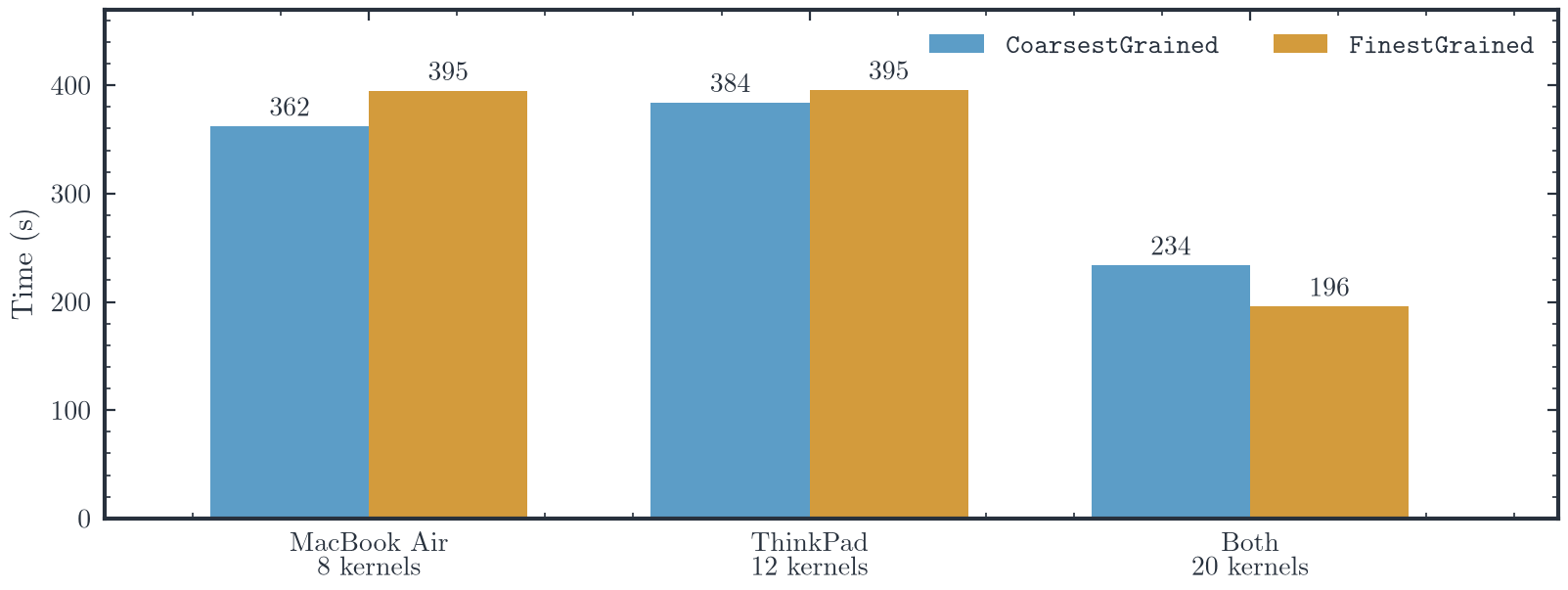
Fig. 1. Time to compute the spectral radii of 120 random real $3000 \times 3000$ matrices in Mathematica on the MacBook Air, the ThinkPad and both, with the coarsest and finest grained distribution of tasks.
On its own, the MacBook Air takes 362 s and the ThinkPad 384 s with CoarsestGrained. The twelve kernels of the ThinkPad run on its twelve hardware threads and finish ten matrices each in that time, so a ThinkPad kernel needs about 38 s per matrix. The M1 has four performance and four efficiency cores, so its eight kernels do not all run at the same speed. With CoarsestGrained, Mathematica gives each of the twenty kernels six matrices at the start, and the run cannot end before the ThinkPad kernels finish their six, after about $6 \times 38 \approx 230$ s. The run took 234 s. With FinestGrained, each kernel takes a new matrix as soon as it finishes the previous one, so the faster kernels do more of the work, and the run took 196 s. The finest grained distribution is therefore the better choice when the kernels run at different speeds.
In the notebook, the two methods run back to back on each machine, and each machine was slower in its second run, with FinestGrained, by 9% on the MacBook Air and by 3% on the ThinkPad. The second run started on a warm machine, and the fanless MacBook Air lost the most, so the single-machine runs do not show that either method is faster on one machine. An earlier run over Wi-Fi shows the same pattern, and its times stay within 5% of those over Ethernet. The ThinkPad alone, whose kernels are reached over the network, took 384.3 s over Wi-Fi and 383.9 s over Ethernet with CoarsestGrained, as expected for a benchmark that sends so little data.
5.2 Lorenz trajectories in Julia
The Julia benchmark solves the Lorenz system,
\[\dot{x} = \sigma (y - x), \qquad \dot{y} = x (\rho - z) - y, \qquad \dot{z} = x y - \beta z,\]with $\sigma = 10$, $\beta = 8/3$ and the initial condition $(1, 0, 0)$, up to $t = 100$ with the Tsit5 solver of DifferentialEquations.jl. Each task solves the system for one value of $\rho$ between 10 and 50 and returns only the final state. The benchmark uses Distributed.jl, Julia’s standard library for parallel computing. Eight workers are started on the Mac with addprocs(8), and twelve on the ThinkPad with addprocs over SSH, one per hardware thread. DifferentialEquations.jl and the task function are loaded on every worker with @everywhere, and the workers are split into three WorkerPools, with the eight local workers, the twelve remote workers and all twenty. For each number of trajectories, from 10 to 49,910 in steps of 100, the task is first run on two values of $\rho$ to compile it, and pmap is then timed with @elapsed on each pool. The tasks are sent one at a time to the local pool, in two batches per worker to the remote pool and in four batches per worker to the combined pool.
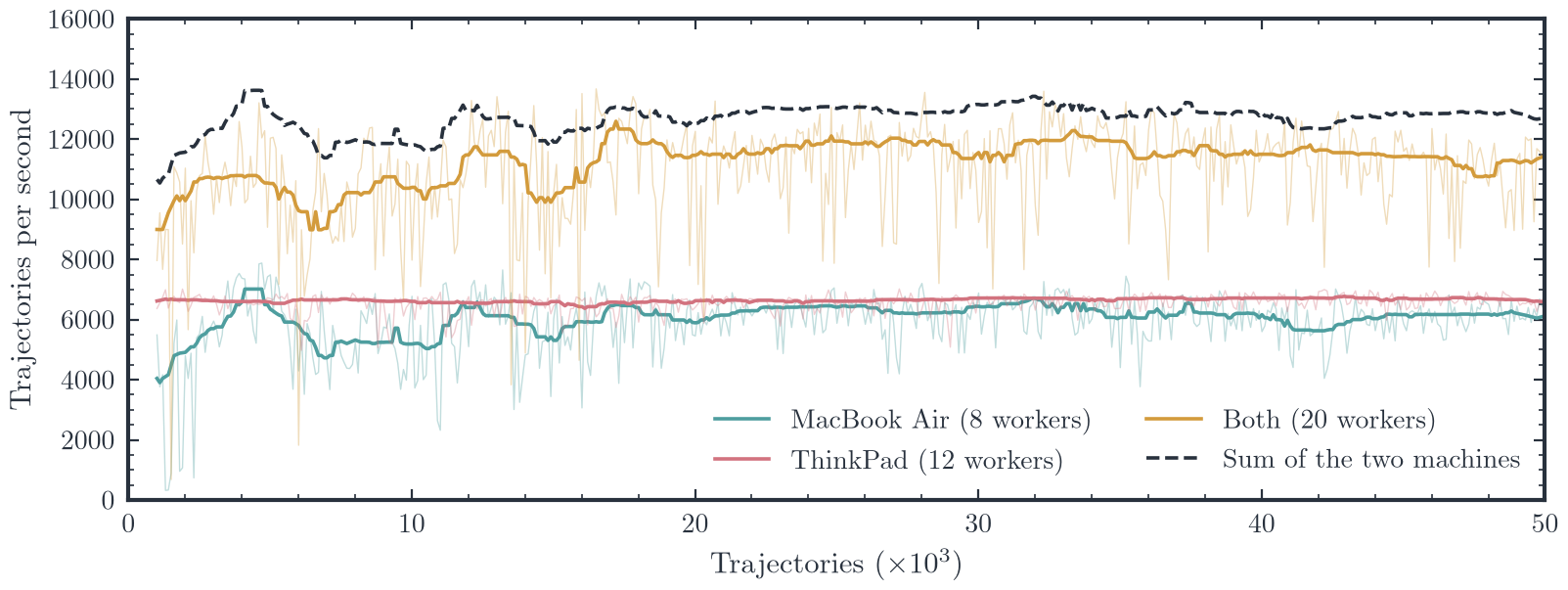
Fig. 2. Lorenz trajectories solved per second in Julia against the number of trajectories, on the MacBook Air, the ThinkPad and both. Thin lines are individual runs, thick lines a running median over 25 runs, and the dashed line the sum of the medians of the two machines. Runs below 1,000 trajectories, which last less than 0.2 s, are not shown.
The ThinkPad, with twelve workers, solves about 6,600 trajectories per second with little variation between runs, and the M1, with eight, about 6,100 with more scatter (Fig. 2). The ThinkPad keeps a constant throughput because its fans hold the CPU below its thermal limit, so it does not throttle. The MacBook Air has no fan and is throttled repeatedly under sustained load, which shows up as the scatter in its rate. All twenty workers together solve about 11,300 trajectories per second, or 89% of the sum of the two machines. The efficiency is lower than in the Mathematica benchmark because each task takes only one or two milliseconds, so scheduling and network messages take up a larger share of the time, even though pmap sends the tasks in batches.
6. Gain in Phase 1
Table III gives the gain of Phase 1 as the speedup of both machines together over the faster machine alone. All the times are measured ones from Section 5, and for each benchmark the faster machine alone is taken with its best method.
Table III. Speedup of the MacBook Air and the ThinkPad together over the faster of the two alone.
| Benchmark | Faster machine alone | Both machines | Speedup |
|---|---|---|---|
Mathematica, CoarsestGrained |
361.9 s | 233.6 s | 1.55 |
Mathematica, FinestGrained |
361.9 s | 195.5 s | 1.85 |
| Julia, 49,910 trajectories | 7.49 s | 4.37 s | 1.71 |
| Julia, median throughput | 6,640 per s | 11,330 per s | 1.71 |
In Mathematica the faster machine alone is the MacBook Air, which takes 361.9 s with CoarsestGrained, and in Julia it is the ThinkPad. With fine-grained tasks spread over both machines, the eigenvalue benchmark runs 1.85 times as fast as on the MacBook Air alone, and the Julia benchmark 1.71 times as fast as on the ThinkPad alone. With CoarsestGrained the gain drops to 1.55, because the slower kernels on the ThinkPad set the finish time. Two machines of similar speed cannot give a speedup much above 1.9, and the Julia benchmark reaches 89% of the summed throughput of the two machines (Fig. 2). For parallel jobs of this kind, Phase 1 therefore cuts the run time by 41–46%, so a job that takes an hour on the faster machine alone finishes in 32–35 minutes.
For the jobs I run most, which split into many independent tasks of a few seconds or more, I think Phase 1 is worth it. A used laptop and an Ethernet cable nearly double what the MacBook Air manages alone. On long runs the ThinkPad also holds a steady speed, while the MacBook Air slows down once it heats up. For tasks of a few milliseconds the gain is somewhat smaller, and tightly coupled problems remain out of reach over 1 GbE (Section 7).
7. Limitations
With a 1 GbE link, Maltár is limited to loosely coupled work. Algorithms that exchange data constantly and need low latency, such as domain-decomposed PDE solvers, hit a latency wall over this link, so I do not attempt model parallelism across it. A modern single-box workstation would also beat Maltár on any single job, since the cluster trades peak performance for redundancy and mobility.
Moving the full cluster with its power bricks and the switch takes two bags, so it is a suitcase lab, but it still travels far better than a 20 kg desktop tower with a fragile GPU mount and glass panels, which does not survive the vibration of a bus ride or a hasty move as well as a laptop. With two operating systems and two processor architectures, there is also more to maintain and more that can go wrong. Even in the first benchmark, the Mac ran Mathematica 14.2.1 and the ThinkPad ran Mathematica 14.3.0.
8. Motivation
For a postdoc who moves often, the main risk is having no compute at all, after losing institutional access or moving to another city at short notice. I built Maltár so that computing power, however modest, remains something I hold on my own terms. If one motherboard fails, the cluster drops to about two thirds of its capacity and keeps running. The whole setup can be moved in a single trip and set up in any room with a power outlet. It can also be expanded in steps of ₹50–60k, which a postdoc stipend allows, rather than with a single ₹2 lakh purchase. For these reasons, never dropping to zero matters more to me than peak FLOPS.
For the story behind the hostnames, see the lore of Maltár.
Linked from
- The Lore of Maltár Of Maltár, and of the names of its strongholds, with apologies to J. R. R. Tolkien.
- Testing Maltár in Julia and Mathematica Julia and Mathematica code for the first Maltár benchmarks, which time a sweep of Lorenz trajectories and a set of eigenvalue problems on two laptops.
- A Direct Ethernet Link between a MacBook Air and an Arch Linux ThinkPad A single USB-C to RJ45 cable between a MacBook Air M1 and a ThinkPad P15 running Arch Linux, with fixed addresses, checks of the link, and passwordless SSH for Julia workers and Mathematica kernels.